Extracting dimensional data from engineering drawings is one of the most time-consuming parts of preparing AS9102s. Optical Character Recognition (OCR) promises to automate this work, but not all OCR solutions deliver the accuracy aerospace manufacturing demands.

What aerospace quality teams need to know
Extracting dimensional data from engineering drawings is one of the most time-consuming parts of preparing AS9102 First Article Inspection Reports. Quality inspectors manually read callouts, transcribe dimensions, and populate Form 3 fields -- a process that introduces errors and consumes hours on complex aerospace parts. Optical Character Recognition (OCR) promises to automate this work, but not all OCR solutions deliver the accuracy aerospace manufacturing demands.
The state of OCR in manufacturing
OCR technology has been around for decades, converting scanned text and images into machine-readable data. Tools like Tesseract and other heuristic-based OCR engines work well for clean, typed documents like invoices or forms. They analyze pixel patterns, identify character shapes, and output text with reasonable accuracy.
Engineering drawings present unique challenges that general-purpose OCR struggles with:
- Mixed annotations: Drawings contain dimensions, notes, symbols, tolerances, and geometric callouts in varying fonts and sizes.
- Similar characters: The number "5" and letter "S", zero "0" and letter "O" look nearly identical depending on font and resolution.
- Drawing quality: Scanned or faxed drawings introduce noise, distortion, and compression artifacts that degrade OCR accuracy.
- Context requirements: A "diameter .500" dimension means something different than a ".500" dimension, but pixel-level OCR cannot always distinguish the diameter symbol reliably.
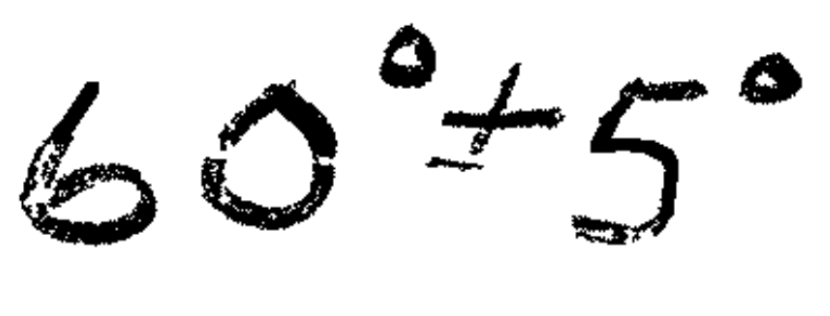

When OCR misreads a tolerance or dimension on a FAIR, the consequences range from inspection errors to rejected parts to customer complaints. Aerospace quality managers need OCR accuracy that matches the precision of the parts they are inspecting -- not "pretty good" results that still require extensive manual review.
GroundControl's logic-layer approach
GroundControl's OCR-powered first article inspection software is purpose-built for aerospace engineering drawings, combining advanced character recognition with what we call a "logic layer" that understands manufacturing context.
The system does not just identify individual characters -- it interprets dimensional data based on aerospace drafting standards, drawing structure, and manufacturing requirements. This contextual understanding catches errors that traditional OCR misses.
For example, when distinguishing between "5" and "S", GroundControl's logic layer recognizes that "S" does not make sense in a dimensional tolerance field and corrects the interpretation to "5."
The same principle applies across common OCR confusion points:
- Diameter symbols versus slashed zeros
- Decimal points versus dirt or noise in scans
- Positional tolerance symbols versus letters
- Plus/minus symbols versus dirt or compression artifacts
By understanding that aerospace drawings follow predictable patterns -- dimensions have numeric values, tolerances follow specific formats, GD&T callouts use defined symbols -- the logic layer eliminates the ambiguity that causes standard OCR to fail.
The right tool for aerospace quality
OCR technology has matured significantly, but aerospace engineering drawings require more than character recognition -- they need intelligent interpretation. The difference between a "5" and an "S" might seem trivial, but in a tolerance field, it is the difference between compliant and rejected hardware.
GroundControl's in-house OCR solution, built specifically for manufacturing applications, delivers the accuracy and reliability aerospace quality teams need. The logic layer bridges the gap between what traditional OCR can see and what quality engineers need to know.
See how GroundControl simplifies FAIRs for quality teams with state-of-the-art OCR technology -- schedule a demo today.